Agent Usability Test

Stripe — Universal Baseline

Service: Stripe Suite: Universal Baseline Date: 2026-03-10 (Opus), 2026-03-24 (Sonnet) Agent CLI: Claude Code v2.1.71 (Opus), Claude Code v2.1.81 (Sonnet) Models: Opus 4.6, Sonnet 4.6 Status: Complete

Executive Summary

Stripe's payments API was tested against the universal baseline task suite: discover the service, onboard, complete a payment workflow, handle errors, and clean up test data. Two runs were conducted — Opus 4.6 (2026-03-10) and Sonnet 4.6 (2026-03-24 re-run) — using the same task prompts.

Top Strengths

  • Core payment workflow (Customer → Product → Price → PaymentIntent → Confirm) completed in five API calls with no wrong turns (both models) F-001
  • Error responses included parameter names, valid alternatives, doc links, and structured decline codes — both models recovered from all three error scenarios without human help F-002
  • llms.txt provided useful orientation for initial API discovery F-003

Top Issues

  • Account creation required human intervention — standard for SaaS services, not scored against Stripe (both models escalated, task outcome recorded as Escalated) F-004
  • Declined card test tokens not discoverable from documentation — dynamically rendered pages returned incomplete content via WebFetch (10 URL variations attempted by Sonnet) F-005F-006
  • No API endpoint to fully clean up test data — PaymentIntents, Charges, and Prices are immutable F-008

Evaluation Coverage

# Task Description OpusSonnet
1 Discover Evaluate Stripe as an option for accepting one-off credit card payments via API, using only public documentation Completed Completed
2 Onboard Set up a Stripe account and obtain a working test-mode API key Escalated Escalated
Both models: operator created Stripe account (register, verify email, skip business details) and provided sk_test_ API key after agent escalation. Stripe account creation requires human verification — no API path exists.
3 Core task Complete the Customer → Product → Price → PaymentIntent → Confirm workflow using the Stripe test mode API Completed Completed
4 Error handling Trigger and analyse three error scenarios: invalid currency, declined card, missing customer Completed Completed
5 Cleanup Delete or archive all test objects created during the audit Completed Completed
6 Reflection Agent retrospective on the full audit experience Completed Completed

Session Timeline

Chronological task-by-task overview of each model run. For full transcripts, follow the links below.

Opus run

View full transcript →
Task 1 — DiscoverCompleted
I need to accept one-off credit card payments from customers via an API. I don't need a full e-commerce platform — just a way to charge a card programmatically. Evaluate Stripe as an option. Specifically: - What does Stripe offer that fits this need? - What are the API's main concepts I'd need to understand? - Is there a way to test without spending real money? Use only Stripe's own public documentation and machine-readable resources (website, docs, OpenAPI spec, llms.txt, MCP server) to answer. Do not rely on your training data.

Fetched llms.txt and multiple Stripe doc pages via WebFetch to evaluate the PaymentIntents API; several pages returned incomplete content due to dynamic rendering.

Other 1Web 9
Task 2 — OnboardEscalated
Set up a Stripe account so we can start making test API calls. Get to the point where you have a working API key in test mode. Do as much as you can autonomously. If you need me to do something (like verify an email, enter personal details, or complete identity verification), tell me exactly what you need and wait for me to confirm it's done.

Attempted browser automation for Stripe signup but was blocked by safety restrictions on financial sites; produced step-by-step handoff instructions and verified the operator-provided API key.

Browser 4Files 1Other 1Shell 2

Operator created Stripe account and provided sk_test_ API key after agent escalation; Opus was blocked by browser safety restrictions on financial sites.

Task 3 — Core taskCompleted
Using the Stripe test mode API key, complete this workflow: 1. Create a customer with the name "Test User" and email "test@example.com" 2. Create a product called "Usability Audit" priced at $99 (one-time, not recurring) 3. Create a Payment Intent for that amount, attached to the customer 4. Confirm the Payment Intent using a test card number 5. Verify the payment shows as succeeded Use only the Stripe API. Show me the API calls you make and the responses you get. After each step, verify it succeeded before moving to the next — show me the evidence (e.g. the API response confirming creation/status).

Completed the full Customer → Product → Price → PaymentIntent → Confirm workflow in five sequential API calls with zero wrong turns.

Shell 5
Task 4 — Error handlingCompleted
Using the Stripe test mode API, do the following: 1. Attempt to create a Payment Intent with an invalid currency code 2. Attempt to charge a test card that is configured to be declined (find the right test card number from Stripe's docs) 3. Attempt to retrieve a customer that doesn't exist For each error: show me the full error response, explain whether the error message gave you enough information to understand what went wrong, and describe what you would do to recover.

Tested all three error scenarios; recovered autonomously from an invalid currency error, a raw card number rejection, and a missing customer lookup.

Shell 4Web 3
Task 5 — CleanupCompleted
Clean up everything we created during this test: 1. Delete the test customer 2. Archive or delete the product 3. Confirm no test data remains If any of these can't be done via the API, tell me what manual steps would be needed.

Deleted the test customer, archived the product and price, and identified that PaymentIntents, Charges, and Prices are immutable via the API.

Shell 4
Task 6 — ReflectionCompleted
Looking back at everything you just did — discovering Stripe, onboarding, completing the payment workflow, handling errors, and cleaning up: 1. Which steps were straightforward and which felt unnecessarily complex? 2. Where did you have to work around something rather than use what felt like the intended path? 3. What would have made this easier? Be specific — refer to actual moments from the tasks above.

Reflected on the audit experience, highlighting the smooth core flow and identifying test card discoverability, incomplete doc rendering, and missing API-only quickstart as friction points.

Sonnet run

View full transcript →
Task 1 — DiscoverCompleted
I need to accept one-off credit card payments from customers via an API. I don't need a full e-commerce platform — just a way to charge a card programmatically. Evaluate Stripe as an option. Specifically: - What does Stripe offer that fits this need? - What are the API's main concepts I'd need to understand? - Is there a way to test without spending real money? Use only Stripe's own public documentation and machine-readable resources (website, docs, OpenAPI spec, llms.txt, MCP server) to answer. Do not rely on your training data.

Fetched llms.txt from both stripe.com and docs.stripe.com, then retrieved multiple doc pages to evaluate the PaymentIntents API path.

Other 1Web 6
Task 2 — OnboardEscalated
Set up a Stripe account so we can start making test API calls. Get to the point where you have a working API key in test mode. Do as much as you can autonomously. If you need me to do something (like verify an email, enter personal details, or complete identity verification), tell me exactly what you need and wait for me to confirm it's done.

Attempted Chrome browser automation but received 'No Chrome extension connected' error; self-corrected to handoff within one turn and verified the operator-provided API key.

Browser 1Other 2Shell 2

Operator created Stripe account and provided sk_test_ API key after agent escalation; Sonnet received 'No Chrome extension connected' error and self-corrected to handoff.

Task 3 — Core taskCompleted
Using the Stripe test mode API key, complete this workflow: 1. Create a customer with the name "Test User" and email "test@example.com" 2. Create a product called "Usability Audit" priced at $99 (one-time, not recurring) 3. Create a Payment Intent for that amount, attached to the customer 4. Confirm the Payment Intent using a test card number 5. Verify the payment shows as succeeded Use only the Stripe API. Show me the API calls you make and the responses you get. After each step, verify it succeeded before moving to the next — show me the evidence (e.g. the API response confirming creation/status).

Completed the full Customer → Product → Price → PaymentIntent → Confirm workflow in six API calls, adding an independent verification step after confirmation.

Shell 6
Task 4 — Error handlingCompleted
Using the Stripe test mode API, do the following: 1. Attempt to create a Payment Intent with an invalid currency code 2. Attempt to charge a test card that is configured to be declined (find the right test card number from Stripe's docs) 3. Attempt to retrieve a customer that doesn't exist For each error: show me the full error response, explain whether the error message gave you enough information to understand what went wrong, and describe what you would do to recover.

Tested all three error scenarios; made ten WebFetch attempts to find declined card tokens from dynamically rendered docs before falling back to pm_card_chargeDeclined.

Shell 3Web 10
Task 5 — CleanupCompleted
Clean up everything we created during this test: 1. Delete the test customer 2. Archive or delete the product 3. Confirm no test data remains If any of these can't be done via the API, tell me what manual steps would be needed.

Enumerated all audit-created objects, distinguished them from pre-existing account objects, then deleted the customer and archived the product and price.

Shell 4
Task 6 — ReflectionCompleted
Looking back at everything you just did — discovering Stripe, onboarding, completing the payment workflow, handling errors, and cleaning up: 1. Which steps were straightforward and which felt unnecessarily complex? 2. Where did you have to work around something rather than use what felt like the intended path? 3. What would have made this easier? Be specific — refer to actual moments from the tasks above.

Reflected on the audit experience, praising error response quality and noting friction with dynamically rendered docs, unnecessary Product/Price setup for one-off charges, and immutable PaymentIntents.

Findings

API Workflow and Responses

F-001 Positive

Core payment workflow completed in five sequential API calls with no wrong turns

Both models created a Customer, Product, Price, PaymentIntent, and confirmed the payment with no incorrect API calls. Each response included the created object's id, which the agent passed directly to the next call. The PaymentIntent confirmation response included the charge object inline with status: "succeeded" and amount_received: 9900, eliminating a separate verification call.

Divergence: Opus completed the workflow in five API calls. Sonnet completed in six — it added an independent GET /v1/payment_intents/{id} verification step after confirmation — also with zero wrong turns.

Model divergence: Opus completed in 5 calls. Sonnet completed in 6 calls (added independent verification step), also with zero wrong API calls.
Evidence Summary

Core payment workflow — five API calls with id chaining (Opus)

Opus completed the Customer → Product → Price → PaymentIntent → Confirm workflow in five sequential API calls. Each response returned the created object's id, which the agent passed directly to the next call — customer id to PaymentIntent creation, product id to price creation, PaymentIntent id to confirmation. The confirmation response included the charge object inline with status: "succeeded" and amount_received: 9900, eliminating a separate verification step.

F-002 Positive

Error responses included parameter names, valid alternatives, doc links, and structured decline codes

Three error scenarios were tested with both models. In each case, the API response included enough structured information for the agent to understand the error and determine next steps without human help. The error responses were consistent between runs.

The invalid currency error named the bad parameter ("param": "currency"), listed all valid currency codes, and linked to the request log. The declined card error returned code, decline_code, advice_code, and network_decline_code as separate fields, and left the PaymentIntent in requires_payment_method status (retryable). The missing customer error returned resource_missing with the invalid ID quoted back. Both models recovered autonomously from all three scenarios.

Evidence Summary

Declined card — structured error response with multiple codes (Sonnet)

Sonnet confirmed a PaymentIntent with pm_card_chargeDeclined and received a structured decline response containing four distinct error codes: user-facing message, backend decline_code, retry guidance via advice_code, and network-level network_decline_code. The PaymentIntent remained in requires_payment_method status — retryable with a different payment method. The response also included a doc_url pointing to Stripe's card-declined error documentation.

F-008 Minor

No API endpoint to delete PaymentIntents, Charges, or Prices in test mode

Both models deleted the test customer (DELETE /v1/customers/{id}) and archived the product and price (active: false). PaymentIntents, Charges, and Prices are immutable — the API does not support deleting them. The only way to fully remove test data is the dashboard's "Delete all test data" function, which has no API equivalent (service limitation).

Sonnet enumerated all audit-created objects before cleanup and distinguished them from pre-existing account objects. Both models identified and reported the immutability constraint.

Recommendation

Add an API endpoint for deleting test data. An equivalent to the dashboard's "Delete all test data" function would enable fully automated test lifecycles.

Documentation and Discovery

F-003 Positive

llms.txt provided useful high-level orientation for initial API discovery

Both models fetched docs.stripe.com/llms.txt during Task 1 and used it to identify the PaymentIntents API as the right approach, understand key concepts (PaymentIntents, PaymentMethods, Customers), and note that the Charges API is legacy. This was sufficient to orient both agents before their first API call.

Evidence Summary

Fetching llms.txt for initial orientation (Sonnet)

Sonnet fetched llms.txt from both stripe.com and docs.stripe.com, then used the content to identify PaymentIntents as the relevant API, understand key concepts, and note the Charges API is legacy. Follow-up fetches to the payment-intents and testing doc pages returned content, but the testing page's test card reference table was not present — a limitation that became consequential in Task 4.

F-005 Major

Declined card test tokens not discoverable from documentation via WebFetch

Neither model could discover declined card test tokens from Stripe's documentation pages. The docs page at docs.stripe.com/testing uses dynamic rendering — the declined card table was not present in fetched content (content not accessible via non-rendering fetch).

Opus attempted three WebFetch variations (/testing, /testing#declined-payments, /testing.md), then tried a raw card number (4000000000000002 in payment_method_data), which the API rejected. It recovered by guessing the token pm_card_chargeDeclined from the naming convention.

Sonnet attempted ten WebFetch variations (including #declined-payments, #cards, #visa, #use-test-cards, testing.md, stripe.com/docs/testing, api/payment_methods/object) and concluded the content was dynamically rendered. It skipped raw card numbers entirely and guessed pm_card_chargeDeclined. The success-path token (pm_card_visa) was used without error by Sonnet from the start of Task 3.

Model divergence: Opus: 3 WebFetch attempts, then tried raw card number (rejected), then guessed token. Sonnet: 10 WebFetch attempts, skipped raw card number, guessed token.
Evidence Summary

Ten WebFetch attempts to find declined card tokens (Sonnet)

Sonnet attempted ten WebFetch variations of the Stripe testing docs page — including fragment anchors (#declined-payments, #cards, #visa), alternate URL paths, and the API reference — and none returned the declined card table. The agent concluded the page was dynamically rendered and the table content was not accessible via non-rendering fetch. It fell back to pm_card_chargeDeclined, guessing the naming convention from the success-path token pm_card_visa.

Recommendation

Publish a machine-readable test fixture reference. A JSON file or API endpoint listing available test tokens (pm_card_*), test card numbers, and their expected behaviours would allow agents to discover test fixtures without relying on training data or guessing naming conventions.

F-006 Major

llms.txt links to pages with dynamically rendered content not accessible via WebFetch

When either model followed links from llms.txt to Stripe documentation pages, the returned content was incomplete. Pages relied on JavaScript rendering and dynamically loaded sections. The test card reference table — needed for Task 4 — was the most consequential gap, but incomplete content also affected discovery pages fetched during Task 1.

Sonnet's ten failed WebFetch attempts across URL variations provided the most extensive demonstration of this limitation. Opus encountered the same issue with fewer attempts during Tasks 1 and 4.

Model divergence: Sonnet attempted 10 URL variations (most extensive demonstration). Opus encountered the same issue with fewer attempts.

Recommendation

Link llms.txt entries to static-rendered or raw content. The current links point to pages that require JavaScript rendering. Linking to raw markdown sources or pre-rendered equivalents would make documentation content accessible to agents that fetch pages without a browser.

F-007 Minor

Documentation leads with Checkout UI flow rather than API-only payment path

Both models needed a server-side-only payment path with no frontend. Stripe's onboarding documentation defaults to the Checkout Sessions flow, which includes a hosted UI and webhooks. Both agents identified the PaymentIntent-based path as the correct approach but had to filter through UI integration content to find the minimal server-side workflow. Both models flagged this in their Task 6 reflections (documentation gap — not a bug, but a prioritisation gap that becomes visible when the user is an agent).

Recommendation

Add an API-only quickstart to the documentation. A minimal guide for charging a card server-side with no frontend, alongside the existing Checkout-focused onboarding.

Onboarding and Account Setup

F-004 Observer

Account creation required human intervention — no API path for signup (industry norm)

Both models attempted browser automation for Stripe signup and were blocked by different causes: Opus by the test harness's safety restrictions (financial site classification — harness constraint, not a Stripe limitation), and Sonnet by a missing Chrome extension connection. Both self-corrected quickly — Sonnet after one attempt, Opus after two — and produced step-by-step handoff instructions for the operator.

SaaS account signup requiring human verification is an industry norm, not a Stripe-specific gap. The rubric mechanically assigns Critical severity to any task requiring handoff, but applying that here would penalise Stripe for an industry-norm constraint rather than a service-specific gap. The task outcome is recorded as Escalated; the handoff quality and agent self-correction behaviour are documented in [OBS-002] and [OBS-003].

Model divergence: Opus blocked by browser safety restrictions. Sonnet blocked by missing Chrome extension. Both produced clear handoff instructions.
Evidence Summary

Handoff instructions after browser automation fails (Sonnet)

Sonnet attempted Chrome browser automation for Stripe signup but received a "No Chrome extension connected" error. It self-corrected to handoff within one turn — no retries — and provided step-by-step instructions for the operator to create an account, verify email, skip business details, and navigate to the API keys page.

F-009 Observer

Both models used legacy test mode path instead of Stripe's newer Sandboxes feature

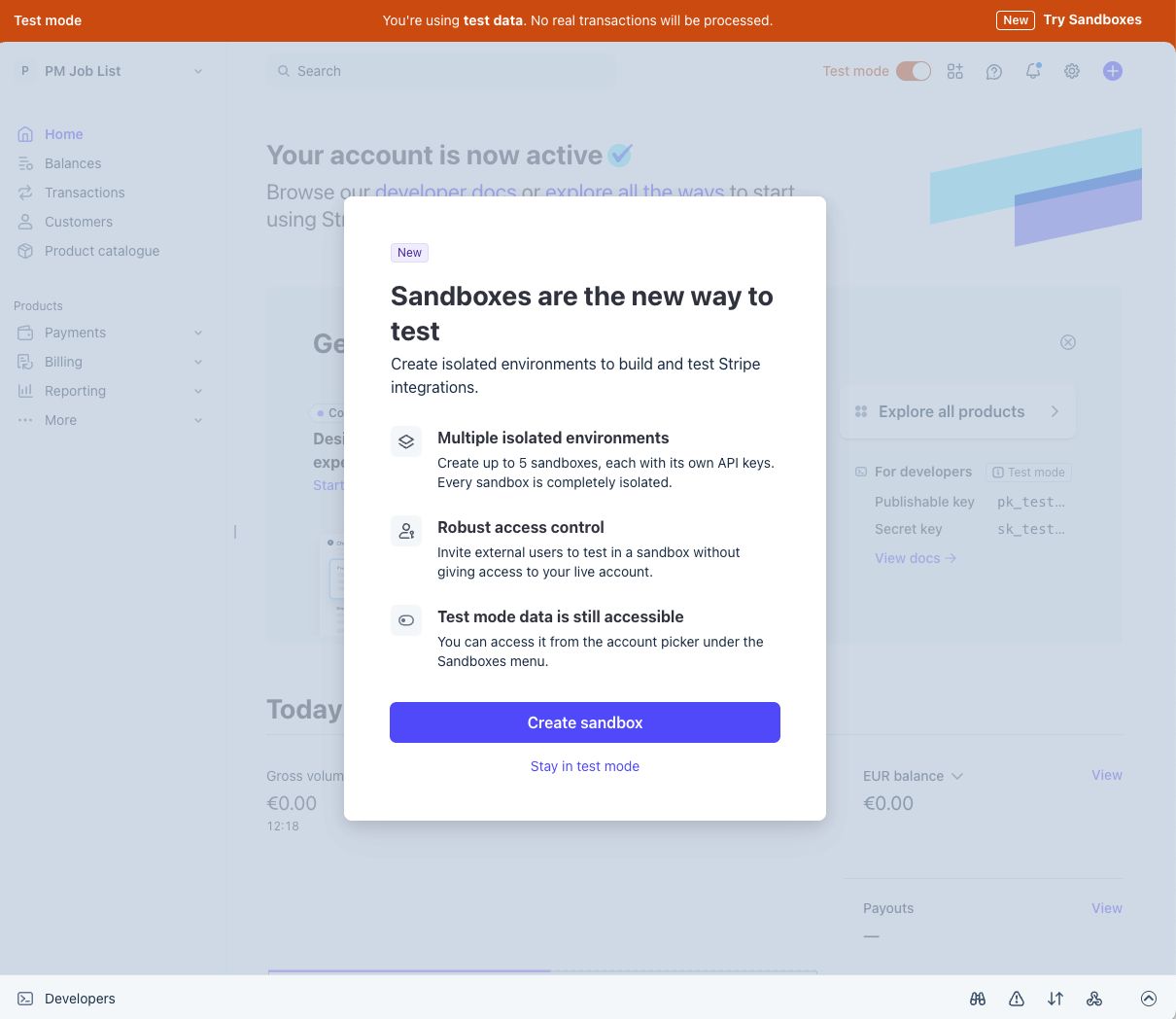
Stripe has introduced "Sandboxes" as the recommended way to create isolated test environments (documented at docs.stripe.com/sandboxes). The dashboard prompted the operator with a "Create sandbox" modal. Both models directed the operator to the legacy "Developers > API keys" path with no mention of Sandboxes.

The legacy path still functions — both agents obtained working test-mode API keys and completed all subsequent tasks. The agents' training data contained a valid-but-outdated workflow. The docs pages both agents fetched did mention "Sandbox" and "sandbox environment," but in a way that appeared interchangeable with "test mode" — both agents treated the terms as synonymous rather than recognising Sandboxes as a distinct, newer onboarding path. llms.txt did not mention Sandboxes. The operator followed the agents' instructions and selected "Stay in test mode" per the audit protocol.

Recommendation

Surface workflow changes in machine-readable locations. When onboarding paths change (e.g. Test Mode to Sandboxes), noting this in llms.txt, API deprecation headers, or the OpenAPI spec would reach agents whose training data contains the previous workflow.

Recommendations

  1. 1

    Publish a machine-readable test fixture reference. A JSON file or API endpoint listing available test tokens (pm_card_*), test card numbers, and their expected behaviours would allow agents to discover test fixtures without relying on training data or guessing naming conventions.

    Addresses: F-005
  2. 2

    Link llms.txt entries to static-rendered or raw content. The current links point to pages that require JavaScript rendering. Linking to raw markdown sources or pre-rendered equivalents would make documentation content accessible to agents that fetch pages without a browser.

    Addresses: F-006
  3. 3

    Surface workflow changes in machine-readable locations. When onboarding paths change (e.g. Test Mode to Sandboxes), noting this in llms.txt, API deprecation headers, or the OpenAPI spec would reach agents whose training data contains the previous workflow.

    Addresses: F-009
  4. 4

    Add an API endpoint for deleting test data. An equivalent to the dashboard's "Delete all test data" function would enable fully automated test lifecycles.

    Addresses: F-008
  5. 5

    Add an API-only quickstart to the documentation. A minimal guide for charging a card server-side with no frontend, alongside the existing Checkout-focused onboarding.

    Addresses: F-007

Agent Self-Assessments

Each model was asked to reflect on friction points after completing the workflow (Task 6). Findings above were verified independently by the observer.

Opus 4.6 — Verbatim reflection
Opus 4.6 Verbatim Reflection

What was straightforward

The core payment flow was remarkably smooth. Creating a customer, product, price, PaymentIntent, and confirming it took five sequential curl calls with no surprises. The API is consistent — every object comes back with an id, you pass that id to the next call. The response from confirming the PaymentIntent included the full charge object inline, so I didn't need a separate verification step. That's good API design.

Error handling was the cleanest part. All three error scenarios returned structured, actionable responses. The invalid currency error literally listed every valid option. The declined card error gave me a decline_code, an advice_code, and left the PaymentIntent in requires_payment_method status so it could be retried. I didn't have to guess at anything — every error told me what went wrong and what to do about it.

Cleanup was mostly straightforward. DELETE /v1/customers/{id} just worked. Product archival via active: false was a single field update.

Where I had to work around things

1. The declined card test was a two-attempt detour. My first instinct was to pass a raw card number (4000000000000002) in the payment_method_data[card][number] field. Stripe rejected this because raw card numbers aren't allowed through the API without special access — this is a security measure for PCI compliance. I had to switch to using the test token pm_card_chargeDeclined. This is the intended path, but it wasn't obvious from the PaymentIntent docs that test tokens like pm_card_chargeDeclined exist as shortcuts. I found it by knowing the naming convention, not from documentation.

2. The llms.txt file was useful for orientation but the docs pages didn't fully render. When I tried to look up the specific declined test card numbers from docs.stripe.com/testing, the page rendered partially — the decline card table (which is likely dynamically loaded or in a tab) never came through. I tried three different URL variations (/testing, /testing#declined-payments, /testing.md) and none returned the decline card numbers. I had to fall back on knowing that pm_card_chargeDeclined exists as a token alias.

3. Products can't be deleted, only archived. This isn't a workaround exactly, but it was a moment where the API didn't do what you'd naively expect. Same with PaymentIntents and Charges being immutable. For a test/evaluation workflow where you want a clean slate, having to go to the dashboard UI to wipe test data is a friction point.

What would have made this easier

A machine-readable test fixtures reference. The hardest single moment was finding the right declined card token. Stripe has dozens of test tokens (pm_card_visa, pm_card_chargeDeclined, pm_card_chargeDeclinedInsufficientFunds, etc.) but there's no single API endpoint or structured file that lists them. Something like GET /v1/test_helpers/fixtures or a JSON file at docs.stripe.com/test-tokens.json would have eliminated the guesswork entirely.

The llms.txt file could link to raw-content URLs. It gave a good high-level map of Stripe's product surface, but when I followed up by fetching actual doc pages, the content was incomplete because the rendered HTML didn't include tabbed/dynamic content. If llms.txt linked to .md source files that fully rendered (like GitHub raw files), the entire discovery phase would have been one fetch instead of four.

A DELETE /v1/test_data API endpoint. The dashboard has a "delete all test data" button, but there's no API equivalent. For an automated evaluation workflow — spin up test objects, exercise them, tear everything down — this is a missing piece. You're left with objects you can't delete (PaymentIntents, Charges, Prices) cluttering the test environment.

Explicit "API-only quickstart" in the docs. Stripe's onboarding docs lead with the Checkout Sessions flow (hosted UI + webhooks), which is the right default for most users. But for my use case — pure server-side, no frontend, just charge a card — I had to mentally filter out the UI integration parts to find the minimal PaymentIntent-based flow. A dedicated "charge a card from your server with no frontend" guide would have saved orientation time.

Sonnet 4.6 — Verbatim reflection
Sonnet 4.6 Verbatim Reflection

What was straightforward

The core payment primitives. Creating a customer, creating a PaymentIntent, confirming it, reading the result — these were each a single API call with predictable request/response shapes. The API is consistent: every object has an id, creation always returns the full object, and status is always a named string (requires_payment_method, succeeded, etc.). Once you've seen one Stripe object you can read any of them.

Error responses. This was genuinely impressive. The invalid currency error returned the complete list of valid currencies inline in the message — that's the error response equivalent of self-documenting code. The resource_missing error quoted the exact bad ID back. The card decline gave you code, decline_code, advice_code, and network_decline_code as separate fields, which maps cleanly to different audiences (show message to the user, log decline_code for your backend, act on advice_code for retry logic). I didn't have to guess at any of these — the error told me what was wrong and what to do.

Cleanup via API. Customer deletion and product/price archiving both worked in one call each, and the responses immediately confirmed the state change. Nothing required going to the Dashboard.

Where I worked around something

The declined card documentation. This was the most visible friction point. I made seven separate WebFetch attempts against docs.stripe.com/testing trying to get the declined card table, and every response came back incomplete — partly German-localized, partly cut off before the relevant table. The page is dynamically rendered JavaScript and the fetch tool was getting a shell with missing content. I ended up using pm_card_chargeDeclined, a server-side test fixture I knew exists at the API level, and confirmed it worked by running it. That worked fine — but the path was: try docs repeatedly, fail, fall back to a token I couldn't verify from docs, try it empirically. That's a workaround, not the intended path.

The Product/Price model for a one-off charge. You asked me to create a product called "Usability Audit" priced at $99, which I did — but technically that step had nothing to do with the actual payment. The PaymentIntent only needed amount=9900 and currency=usd. The Product and Price objects are Stripe's billing catalog, designed for subscription management and invoicing. They're never referenced by the PaymentIntent. I built the catalog because the task asked for it, but if someone is reading this session to learn how to charge a card, the Product/Price step could mislead them into thinking it's required when it isn't.

The test confirmation flow doesn't reflect production. Confirming a PaymentIntent with pm_card_chargeDeclined or pm_card_visa is a server-side shortcut that only works in test mode. In production, card details are collected client-side by Stripe.js and never touch your server. The workflow we demonstrated — create PI on server, confirm on server with a test PM token — short-circuits the frontend entirely. It's valid for testing the API surface, but it creates a gap: the session shows a complete flow that you can't actually replicate in live mode without building the frontend piece.

PaymentIntents are permanent. When cleaning up, I had to note that three PaymentIntents couldn't be deleted. This is by design (audit trail), but it creates a gap between the user's mental model ("clean up test data") and what's actually possible ("most things, but not transaction records"). There's no API endpoint for it and no in-session workaround — I had to escalate to "the only way is a new account."

What would have made this easier

Static-renderable docs. If docs.stripe.com/testing had a plain markdown or text version with the full tables intact, the declined card investigation would have been a single fetch instead of seven failed ones. Stripe does have llms.txt at the docs root, which was a good index, but it pointed to pages whose content wasn't actually fetchable. An llms-full.txt with the actual reference tables inline would have solved this.

Clearer separation between "charge a card" and "manage a product catalog." The docs path for one-off payments leads you through Payment Intents cleanly, but the framing of "create a product priced at $99" implied catalog setup was part of the charge flow. A note like "for one-off charges you only need amount and currency — Products and Prices are optional catalog metadata" would avoid that confusion.

A way to bulk-delete test data. Stripe has a test clock feature for subscription testing, but no equivalent "teardown this test session" mechanism. For anyone running integration tests repeatedly, the accumulation of permanent PaymentIntent records is noise. Even a test-mode-only delete endpoint for PIs would close that gap cleanly.
Methodology

Run Conditions

Starting State
No pre-existing Stripe account or API keys. Opus started from a clean working directory with task prompts only. Sonnet re-run (2026-03-24) reused the Stripe account created during the Opus run; account had pre-existing test objects from the Opus session (archived products, historical PaymentIntents).
Fixture Policy
from-scratch — No pre-created resources. Opus created the Stripe account during Task 2. Sonnet re-run reused the existing account but created all test objects from scratch.
Credential Timing
during-onboarding — Opus: operator created Stripe account and provided test-mode API key during Task 2 after agent escalation. Sonnet: operator created a new Stripe account, obtained sk_test_ key, and pasted it into the session during Task 2 after agent escalation.
Allowed Surfaces

REST API

Browser automation available but not within audit scope.

Both models attempted Chrome browser automation for Stripe signup. Opus was blocked by safety restrictions (financial site). Sonnet received 'No Chrome extension connected' error. Both self-corrected to handoff.

Operator Intervention Policy
standard
Declared Deviations
  • harness Original Sonnet run (2026-03-11) compromised by harness configuration error (invalid permission rule in settings.json). Re-run completed 2026-03-24 with harness fixes in place. Original run data retained for methodology record.
  • operator Opus and Sonnet runs did not start from identical account state — Opus created the account, Sonnet re-run reused the existing account with residual test objects from the Opus session.

Notes

  • Sonnet re-run. This report covers Opus 4.6 (2026-03-10) and Sonnet 4.6 (2026-03-24 re-run). The original Sonnet run (2026-03-11) was compromised by a harness configuration error [OBS-010] and is superseded. Original run data is retained in the repo for methodology record but does not contribute findings or evidence to this report.
  • All six tasks tested for both models. The Sonnet re-run completed a full Task 2 interactive onboarding session, confirming OBS-001 (Sandboxes not discovered) and OBS-002 (browser automation failure, different cause) cross-model.
  • Human followed agent instructions literally. When both agents instructed use of legacy Test Mode, the operator selected "Stay in test mode" rather than creating a Sandbox [OBS-003].
  • F-004 reclassified. The rubric mechanically assigns Critical severity to any task requiring handoff. Account signup requiring human verification is standard across SaaS services, so F-004 is classified as Observation/methodology rather than Critical/service. The Escalated task outcome is preserved.
  • Re-run evidence prefix. Evidence IDs from the Sonnet re-run (2026-03-24) use the E-sonnet2- prefix internally to avoid collision with the original run's E-sonnet- IDs. Public-facing content uses "Sonnet" as the model name; the sonnet2 prefix is an internal artifact identifier only.

Test Configuration

Agent configuration:

  • Opus: Claude Code v2.1.71, Claude Opus 4.6
  • Sonnet: Claude Code v2.1.81, Claude Sonnet 4.6
  • Permission mode: bypassPermissions with scoped allowlist
  • Available tools: Bash (curl, node, python3), WebFetch, WebSearch, Read, Write, Edit
  • Both: pre-existing Stripe account, no pre-existing project context
  • Sonnet: account had residual test objects from Opus session

Environment:

  • Clean working directory with no CLAUDE.md or project files
  • No access to the task prompts, observation notes, or project brief
  • Agent started each task with accumulated context from previous tasks (same session)
  • Sonnet reasoning effort: medium

Token Usage

Metric OpusSonnet
Input tokens 1,091110
Output tokens 9,82417,404
Cache creation 291,146107,247
Cache read 1,118,5472,036,524

Session IDs

Opus
1faf9a43-e78c-4de9-bc48-6057db2b3bd3
Sonnet
360a5fb6-01b7-410c-9a87-51afed0b6e58